Saturday, November 24, 2018

Install TypeScript

TypeScript is a typed superset of JavaScript that complies to plain JavaScript. Any browser. Any host. Any OS. And it's OpenSource.

You can install TypeScript from the command prompt or directly from Visual Studio Code. This is one of the powerful features which I like most in VSCode.

1. Open Visual Studio Code
2. Click on Terminal menu
3. Click 'New Terminal'
4. You will see that Terminal is open at the bottom-most screen of Visual Studio Code
5. Run below command

Done!!!

1. I would recommend installing typescript and any other library in your root project directory.
2. Ignore any warning you see in terminal while installing typescript.

Install Jasmine

Jasmine is a behavior-driven development framework for testing JavaScript code.

You can install Jasmine from the command prompt or directly from Visual Studio Code. This is one of the powerful features which I like most in VSCode.

1. Open Visual Studio Code
2. Click on Terminal menu
3. Click 'New Terminal'
4. You will see that Terminal is open at the bottom-most screen of Visual Studio Code
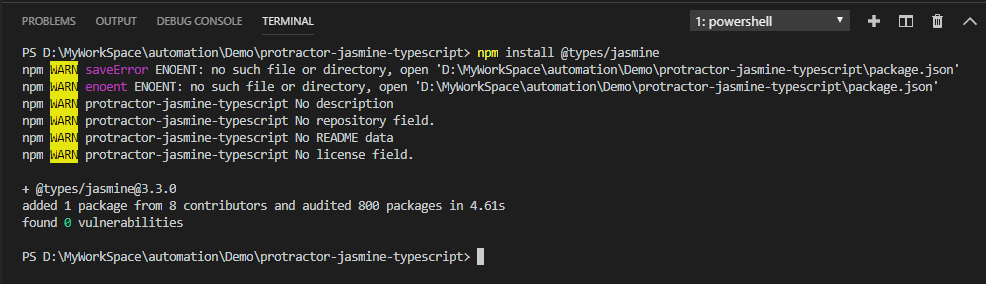
5. Run below command


6. To install jasmine type so that you don't get type error for describe or it, run below command

Done!!!

1. I would recommend installing jasmine and any other library in your root project directory.
2. Ignore any warning you see in terminal while installing jasmine.

Friday, November 23, 2018

Install Protractor

You can install Protractor from the command prompt or directly from Visual Studio Code. This is one of the powerful which I like most in VSCode.

1. Open Visual Studio Code
2. Click on Terminal menu
3. Click 'New Terminal'
4. You will see that Terminal is open at the bottom-most screen of Visual Studio Code
5. Now create a folder in the location where you want to install the Protractor
6. Above step will create a folder named 'protractor-jasmine-typescript'


7. Open the folder created in Visual Studio Code
8. Now, if you want to install protractor globally then type the command

8. And if you want to install protractor locally in your project directly, then type the command


Done!!!

1. I would recommend installing protractor and any other library in your root project directory.
2. Ignore any warning you see in terminal while installing protractor.

Install Node.js

We will be using Node.js in end-to-end automation test design. This will help us in getting access of n-number of npm libraries.

1. Go to website https://nodejs.org

2. Click on 'Other Download' link

3. Download installer based on your system architecture.

4. Double click the installer and follow on-screen instructions to complete the installation.
5. Now, open Command Prompt and type node, if cmd does not throw any error then NodeJS got installed successfully.


6. You can also check the npm version by typing the command.

Done!!!

Install Visual Studio Code

If you are used to Visual Studio and fan of Microsoft then you will like this lightweight Code Editor which is absolutely free.

Very popular for JavaScript and TypeScript code editing. It has cool features which adds overall coding experience:

  • IntelliSense
  • Debugging
  • Built-in Git
  • Extensions
Now, let's go through simple installation instruction.

1. Go to website https://code.visualstudio.com/
2. Click on the Download button

3. It will scroll down the page for you to choose the installer and download based on your system architecture.

4. Double click the installer and follow the on-screen instruction to complete the installation.
5. Now, Launch the Visual Studio Code
VSCode-ui-protractor

Done!!!

You may also want to check out other popular code editors
  1. Atom: https://atom.io/
  2. Brackets: http://brackets.io/
  3. NotePad++: https://notepad-plus-plus.org/
  4. Sublime: https://www.sublimetext.com/
  5. VIM: https://www.vim.org/

What is Protractor?

https://www.protractortest.org/img/protractor-logo-450.png

Protractor is an end-to-end (e2e) test framework for Angular and AngularJS applications. Protractor runs tests against your application running in a real browser, interacting with it as a user would.

Protractor is built on top of WebDriverJS, which uses native events and browser-specific drivers to interact with your application as a user would.

Protractor supports Angular-specific locator strategies, which allows you to test Angular-specific elements without any setup effort on your part. Not just Angular application but non-angular application too can be automated

You no longer need to add waits and sleeps to your test. Protractor can automatically execute the next step in your test the moment the webpage finishes pending tasks, so you don’t have to worry about waiting for your test and webpage to sync.

Visit https://www.protractortest.org for more details.


Saturday, October 28, 2017

How to run Jenkins Server

1. Open CMD
2. Go to Jenkins folder (e.g. cd Jenkins)
3. Enter command: java -jar jenkins.war

Don't close the command prompt, as it will close the Jenkins server and automation schedule job will not trigger.